Showing posts with label Microsoft. Show all posts

Friday, October 23, 2015

#90 Speed up your Windows 10 with these three simple methods

These handy tips will give you faster startup, start menu access and faster shutdown in Windows 10


Are you using the new operating system Windows 10 on a brand-new PC or have you upgraded it in your old machine?

Want a faster computer? Provided below are three easy ways to speed up your Windows 10.


1. Faster Startup

Every time when the Windows boots up, you are asked to provide a password by Microsoft for security purpose. However, don’t you think it should be left to the users to decide if they want to password-protect their PCs? One would think so.

Considering the hoops that one has to jump through to disable the startup password, Microsoft clearly feels very strongly about it. Even though you may be a fast typist, stopping to enter that password costs you at least a few seconds per boot. To save those precious seconds, you can follow the steps below:

Step 1: Type netplwiz inside the Search field and press Enter.

Step 2: Uncheck the box next to Users must enter a username and password to use this computer. Then click Apply and enter your password to approve the change.

That’s it. Say goodbye to startup password.

2. Faster Start Menu

If Windows 10’s smart new Start menu is slow to load on the system, this means that you have a older machine. The reason for slow loading could be animation, and animation consumes horsepower. However, thankfully, you can turn off that animation for speedier access to Start. Here’s how:

Step 1: Type sysdm.cpl in the Search field and then press Enter.

Step 2: Click on the Advanced tab, and then the Settings button in the Performance section.


Step 3: Uncheck the box for Animate windows when minimizing and maximizing, and then click Apply.

It’s done. The Start menu should now snap to life a bit faster.

3. Faster Shutdown

The shutdown process in Windows 10 requires three clicks and a menu. Here’s how you can make the shutdown process faster.

All you need to do is right-click on any open space on the desktop, then click New > Shortcut. A Location field will appear on the screen. Paste the following in the location field:

%windir%\System32\shutdown.exe /s /t 0

Then, click on Next and complete the shortcut setup.

The article helps you? Tell us in the comments below.

#84 Microsoft Finally Changes Irritating Rules of Free Windows 10 Upgrade

Riding on the shoulders of its Free Windows 10 slogans, Satya Nadella has managed to convince about 110 million people to install the Windows 10 operating system on their PCs.

PowerTech & Powertechmation: Microsoft has finally responded to the user complaints regarding the irritating rules of the free Window 10 upgrade. With the upcoming Windows 10 builds, you can use your Windows 7, 8 and 8.1 activation keys.

After tons of complaints and user feedbacks, Microsoft has finally decided to change the free Windows 10 upgrade rules. The smooth Windows 10 upgrade process has been made smoother by allowing you to use your Windows 7, 8 and 8.1 activation keys.

In an official blog, Windows and Device Group Vice President Gabe Aul has revealed the information about an upcoming Windows 10 build that will allow you to activate your free Windows 10 copy using your existing Windows 7, 8 and 8.1 keys.


But, how to do this?

On the blog, Gabe explained that if you install this upcoming Windows 10 Insider Preview on your PC and it doesn’t activate on its own, “you can enter the product key for Windows 7, Windows 8 or Windows 8.1 used to activate the prior Windows version on the same device to activate Windows 10.”

On the blog, Gabe explained that if you install this upcoming Windows 10 Insider Preview on your PC and it doesn’t activate on its own, “you can enter the product key for Windows 7, Windows 8 or Windows 8.1 used to activate the prior Windows version on the same device to activate Windows 10.”

You can perform this activation by going to Settings > Update & security > Activation and selecting Change Product Key.


Giving the Windows users another great news, Gabe said that anyone looking to perform a clean install of Windows 10, would be able to use these Windows 7 and Windows 8 keys during the installation process.

Why is this change so huge?

This change has made the lives of Windows users easy as installing a clean Windows 10 OS is now a better option. Earlier, you had to upgrade your Windows 7, 8 or 8.1 OS to Windows 10 using Windows upgrade, followed by the second step of performing the clean install using the bootable ISO images.

Now, Microsoft has shortened this clean install process as you just need to download the upcoming Windows 10 ISO and perform a clean install right away using the existing Windows keys.

Microsoft explains: “If you do a clean install of Windows 10 by booting off the media, you can also enter the product key from prior Windows versions of qualifying devices during setup.”

Have something to add or any doubts regarding Windows 10 upgrade? Tell us in the comments below.

Thursday, October 22, 2015

#80 Microsoft Debuts Its First Release of Homemade SSH for Windows

Long back in June, Microsoft revealed its intentions to bring SSH for Windows and contributing to the OpenSSH community. Working towards making it a reality, Redmond has released the first iteration of the Windows Powershell version of secure-shell (SSH) tool.

PowerTech & Powertechmation: Working to fulfill its promise, Microsoft has released the first build of the Windows Powershell version of SSH tool. The code has been made publicly available on GitHub where developers can modify and improve it.

By integrating the OpenSSH support into the Windows PowerShell tool, Microsoft will allow system admins to securely log into the Windows boxes and control them using command line scripts just like Linux, BSD and other Unix-type systems. Linus Torvalds, are you listening?

On its blog, Microsoft has released an early work on a Windows port of OpenSSH 7.1. This is built as a joint effort with remote-access developer NoMachine. You can access the public code here on GitHub.

“The NoMachine port was based on OpenSSH 5.9, so we’ve spent the time since our initial announcement working with NoMachine to bring this port in sync with OpenSSH 7.1,” Microsoft writes.

Redmond aims to make this open to contributions into the portable version of OpenSSH. The OpenSSH 7.1 is the first step (total five steps) that will lead up to the production release of OpenSSH in Windows.

It’s expected that within the first half of next year, Microsoft will deliver the complete production build.


What do you think about the SSH for Windows? Tell us in the comments below.
Also read: 3 Students Arrested for Hacking the School Computer and Changing Their Grades

Saturday, September 19, 2015

#51 Microsoft working on Azure Cloud Switch, a Linux-based OS

The operating system is not for PCs and laptops, and is aimed towards users of enterprise and cloud services 

Microsoft is working on a Linux-based operating system, the Azure Cloud Switch (ACS). The announcement was made through an official blog post by Kamala Subramaniam, Principal Architect of Azure Networking. As per the post, the ACS is a “cross-platform modular operating system for data center networking built on Linux.” 


The blog post mentions that there are various types of switch hardware platforms available in the market. It states the difficulty to configure hardware with completely different types of software. To tackle this, it has come up with the Linux-based ACS. It will provide a unified platform for running different types of networking devices with the same software. It will also enable the company to debug more efficiently. Further, the ACS believes in Open Networking, and this will enable it to "use and extend" Open Source, Microsoft, and Third Party applications. The blog post concluded by mentioning that Microsoft decided to talk about ACS in public because the company believes in the approach of separating the switch software from switch hardware to gain popularity in the networking industry.

The software is not aimed at general PCs and laptops, and only aimed at enterprise and cloud-based services. It is not the first time that Microsoft is using rival technologies. Earlier this year, the Redmond-based company had announced its partnership with Cyanogen, where the custom ROM-maker will distribute various Microsoft apps and services. Additionally, it was reported yesterday that Cyanogen is reportedly working on deeper integration of Microsoft’s virtual assistant, Cortana, into Cyanogen OS. 

Sunday, April 5, 2015

#49 Microsoft launches MS-DOS for mobile (Sure, why not)

The MS-DOS mobile is meant for Lumia users only. Read below to find out more. 


Microsoft has just launched MS-DOS for mobile*. Yes, remember that black and white command prompt driven operating system that was a PC stalwart once upon a time? Microsoft just sent out a tweet through its Lumia twitter account, announcing that the OS has been designed exclusively for Lumia phones. The company has also put up a complete blog post on the Lumia Conversations blog, along with a video, explaining how the OS works.


While enthusiasts may have enjoyed tinkering with the OS, Microsoft also mentions that the MS-DOS Mobile preview is an essential download for Lumia phones. This may not sit well with many other Lumia users, though, since MS-DOS is a step back from the current operating systems and their ecosystems. 


Speaking about the OS, Daniel Glass, who led the design team for the OS, said, “Turning our back on the graphics was hugely liberating. We’ve dropped the resolution, and in doing so re-discovered our roots.” Microsoft says that the OS will come pre-installed with certain applications and enthusiasts can also find out hidden functions if they put their minds to it. You can read Microsoft's entire post about going back to the black and white era here.


*Reeling over the absurdity of all of the above yet? Check today's date!

Tuesday, March 31, 2015

#47 Microsoft launches Project Spartan for Windows 10 Technical Preview

Windows 10 Tech Preview build 10049 includes Project Spartan, the company's new browser. 


Microsoft has rolled out its “Project Spartan,” the new browser for Windows 10, for the latest Windows 10 Technical Preview build for PCs. The new browser brings a slew of new features, interface and integration with digital assistant Cortana.


“In this preview, you will see a bold new design for Project Spartan – one that is streamlined and puts the focus on the page, not the browser. This is part of our vision for a browser that doesn’t visually interfere with your life on the Web, but supports it. You will also see some of the features that we demo’ed back in January and we hope you’ll love them,” points out Microsoft in a detailed blog post.


As said above, Project Spartan brings Cortana integration. The personal assistant provides additional information while making browsing easier, staying in the background. It comes with inking capabilities, enables you to write or type directly on the page, comment on what’s interesting or clip what you want – then easily share this “Web Note” via mail, or a social network. The Spartan features a new rendering engine is built around the idea that the Web “just works,” while being faster, more secure and more reliable.


“It’s important to note we’ll have more features and many improvements coming to Project Spartan before we make it broadly available. This preview is NOT a polished, ready-for-everyone release. For Windows Insiders, we’re excited to make Project Spartan available for your feedback, only a short time after we made it available for use internally at Microsoft,” points out Microsoft. 


Meanwhile, Windows 10 Technical Preview Build 10049 is now available. The latest build includes a slew of fixes along with Project Spartan.


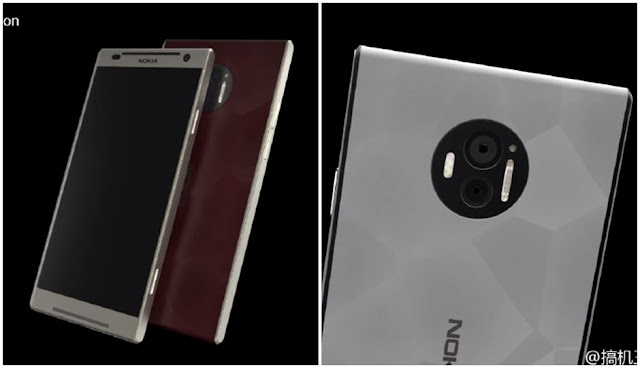
Nokia C1 renders leak ahead of launch, hints at 4GB RAM and dual rear cameras

Is Nokia working on its own AI assistant for smartphones? Nokia is planning its return to the smartphone industry with two new flagshi...